Skip to content


PayHere Gateway for Paymenter
Allowing merchants to integrate PayHereas a payment gateway.
Developer
getFAT
Last Updated
September 12, 2025
Price
$5.00
Installs
2 installs
Purchases
1 purchases
Categories
extension
About this extension
[COLOR=rgb(0, 0, 0)]Accept Visa, MasterCard, Amex, Discover, mobile wallets, and local payment methods directly in Paymenter.
This production-ready gateway integrates PayHere with Paymenter, letting you collect secure payments in LKR and multiple currencies with real-time status updates via IPN webhooks.
Ideal for hosting providers, SaaS, and digital merchants who want a trusted Sri Lankan payment gateway with built-in fraud protection, recurring billing, and seamless checkout without building a custom payment stack.[/COLOR]
[COLOR=rgb(0, 0, 0)]1) Install the Extension
Go to Admin → Browse Extensions in Paymenter and install Payhere.
2) Configure the Gateway
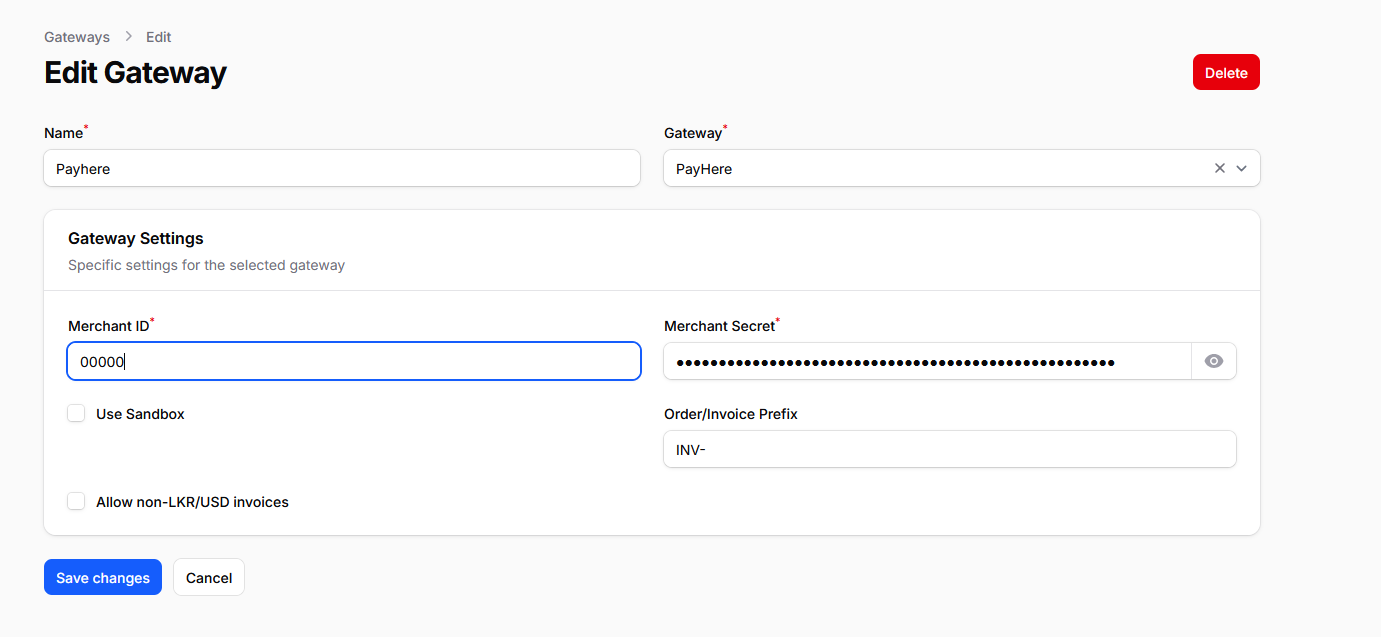
Navigate to Admin → Settings → Extension Settings and fill in:[/COLOR]
Edit <span style="color:rgb(41, 105, 176)"> /var/www/paymenter/routes/web.php</span> with your favourite text editor and place the below code at the bottom and Save .
[CODE=php]// Always load PayHere extension routes (return/cancel/ipn)
require base_path('extensions/Gateways/PayHere/routes.php');[/CODE]
Verify that Paymenter updates the invoice automatically
[/LIST]
Payment not marked completed?
Minimum amount errors?
Minimum amount will be depend on your payhere package.
This production-ready gateway integrates PayHere with Paymenter, letting you collect secure payments in LKR and multiple currencies with real-time status updates via IPN webhooks.
Ideal for hosting providers, SaaS, and digital merchants who want a trusted Sri Lankan payment gateway with built-in fraud protection, recurring billing, and seamless checkout without building a custom payment stack.[/COLOR]
<span style="color:rgb(0, 0, 0)">What this extension does</span>
- <span style="color:rgb(0, 0, 0)">Adds &quot;PayHere&quot; gateway</span><span style="color:rgb(0, 0, 0)"> in Paymenter (v1.0+)</span>
- <span style="color:rgb(0, 0, 0)">Creates invoices with an extermal checkout (Pay Now)</span>
- <span style="color:rgb(0, 0, 0)">Auto‑reconciles payments via IPN (PAID)</span>
- <span style="color:rgb(0, 0, 0)">Attach Transactions to the Invoice</span>
- <span style="color:rgb(0, 0, 0)">Supports Multiple Payment Methods (Visa/Master/FriMe etc)</span>
- <span style="color:rgb(0, 0, 0)">Sandbox mode to test end‑to‑end without real funds</span>
- <span style="color:rgb(0, 0, 0)">Clean logs and minimal configuration.</span>
- <span style="color:rgb(0, 0, 0)">Multiple Currencies (USD/LKR)</span>
<span style="color:rgb(0, 0, 0)">Who is it for?</span>
- <span style="color:rgb(0, 0, 0)">Hosting/VPS providers and resellers using Paymenter</span>
- <span style="color:rgb(0, 0, 0)">SaaS and digital downloads needing global, borderless checkout</span>
- <span style="color:rgb(0, 0, 0)">Projects wanting to add Sri Lankan Based Gateway alongside existing gateways</span>
<span style="color:rgb(0, 0, 0)">How it works (flow)</span>
- <span style="color:rgb(0, 0, 0)">Customer selects PayHere at checkout.</span>
- <span style="color:rgb(0, 0, 0)">Extension redirects customer to the external hosted payment page</span>
- <span style="color:rgb(0, 0, 0)">Customer pays in their chosen currency</span>
- <span style="color:rgb(0, 0, 0)">Statuses are mapped in Paymenter (e.g., confirmed/finished → invoice marked paid).</span>
<span style="color:rgb(0, 0, 0)">Key Features</span>
- S<span style="color:rgb(0, 0, 0)">ecure payment processing</span><span style="color:rgb(0, 0, 0)"> via NowPayments hosted checkout</span>
- <span style="color:rgb(0, 0, 0)">Sandbox/Test mode for safe end‑to‑end testing</span>
- <span style="color:rgb(0, 0, 0)">Works with Paymenter v1.3+</span>
<span style="color:rgb(0, 0, 0)">Requirements</span>
- <span style="color:rgb(0, 0, 0)">Paymenter v1.3 or newer</span>
- <span style="color:rgb(0, 0, 0)">A PayHere merchant account (sign up at <a href="#" target="_blank" rel="noopener noreferrer" class="text-[var(--vp-c-brand-1)] hover:underline">payhere.lk</a>)</span>
<span style="color:rgb(0, 0, 0)">Installation</span>
[COLOR=rgb(0, 0, 0)]1) Install the Extension
Go to Admin → Browse Extensions in Paymenter and install Payhere.
2) Configure the Gateway
Navigate to Admin → Settings → Extension Settings and fill in:[/COLOR]
- Merchant ID (from PayHere dashboard)
- Merchant Secret (from PayHere dashboard)
- Allow non-LKR/USD invoices
- Order/Invoice Prefix
- Sandbox Mode (optional)
Edit <span style="color:rgb(41, 105, 176)"> /var/www/paymenter/routes/web.php</span> with your favourite text editor and place the below code at the bottom and Save .
[CODE=php]// Always load PayHere extension routes (return/cancel/ipn)
require base_path('extensions/Gateways/PayHere/routes.php');[/CODE]
<span style="color:rgb(0, 0, 0)">Testing (Sandbox)</span>
- [COLOR=rgb(0, 0, 0)]Enable Sandbox Mode in the gateway settings
[LIST] - Use the PayHere sandbox portal to generate test payments
[/LIST]
<span style="color:rgb(0, 0, 0)">Troubleshooting</span>
Payment not marked completed?
- [COLOR=rgb(0, 0, 0)]Check Paymenter logs at:
[CODE=bash]storage/logs/laravel.log[/CODE]
[/COLOR]
Minimum amount errors?
Minimum amount will be depend on your payhere package.